

How OrderFlow plans your next supplier order
OrderFlow brings your sales, stock, incoming deliveries and supplier data into one buying workspace. Compare purchasing priorities, see why each case belongs in the order, and shape the final selection around your stores.
A closer look at PURP’s purchasing tools, using actual product screens with demonstration data.
Start with the way your business buys. Choose the stores, supplier, stock-coverage period and spending limits. OrderFlow builds recommendations around that setup, with purchasing alternatives and a reason behind the individual lines.
The buyer can examine the evidence, compare the trade-offs and change the selection before preparing the supplier file.
Use the demand and stock behind the product
A familiar product can need a different order at each store. OrderFlow reads recent sales, current stock and dated incoming purchase orders and transfers when working out the replenishment need. Stock expected before the next delivery has a different effect from stock arriving later. For planning, buyers can review and adjust an incoming delivery’s expected arrival and the share assigned to the store.
Sales need context, too. Where stock-availability history supports it, OrderFlow can account for the days a product was actually available to sell. That helps a buyer examine a slow-looking item that spent part of the period out of stock. When that history is missing, the planner uses observed sales without assuming how long the product was in stock.
Plan seasonal buying around the store’s own history
Seasons and retail occasions can change what belongs in the basket. For supported Canadian retail calendars, P’s choice looks at how a store’s product or category mix changed during the matching prior-year period. That includes seasonal patterns and occasions such as 4/20, long weekends and the holiday period.
Verified changes in that mix can influence which eligible products are preferred. The recommendation still has to fit current demand, case support and spending limits. When the supporting history is incomplete, that comparison does not influence the preference. The rest of the buying plan continues to use its available evidence.
Timing matters for explicitly seasonal products, too. When verified supplier descriptions identify an Advent calendar or Christmas gift pack, OrderFlow can assess whether the expected delivery fits its supported selling window. Product support and the order’s buying limits still apply.
Compare four buying approaches
A buyer protecting cash may choose a different basket from one prioritizing product margin or verified rebates. OrderFlow presents four approaches from the order setup, so you can inspect the trade-off before choosing.
| Plan | What it prioritizes |
|---|---|
| P’s choice | A balanced buying plan built around replenishment need and the assortment choices allowed by your setup. |
| Profit focus | Product-margin opportunities backed by verified selling-price and cost information. |
| Rebate focus | Eligible products with verified positive rebates, alongside the store’s replenishment work. |
| Lower cash spend | Upfront cash commitment and immediate refill needs, with no new-product trials. |
Inspect the upfront total, eligible rebates, refill and trial spend, and available sales and gross-profit estimates. The comparison shows how an alternative differs from P’s choice. Unknown selling prices and incomplete evidence remain visible; the estimates help you choose an order and do not promise future sales or profit.
Fit the supplier cycle, case sizes and budget
Set the period you want the order to cover: the next delivery, a following delivery or a chosen date. OrderFlow uses the supplier calendar and the order’s timing alongside your stock and incoming supply. You can set a spending floor or ceiling and review the order against those limits.
Recommendations work in supplier cases and packs, with the supplier’s current product list, availability and currency in the picture. An available supplier form gives PURP more specific information for that order. Bring the form and supplier you actually use when reviewing the workflow.
OrderFlow separates the need for stock from the size of the case you have to buy. Case carryover and the money committed to the selection are part of the buying decision, so the buyer can examine what the next shipment leaves on the shelf.
Keep the products you need. Make room for choice.
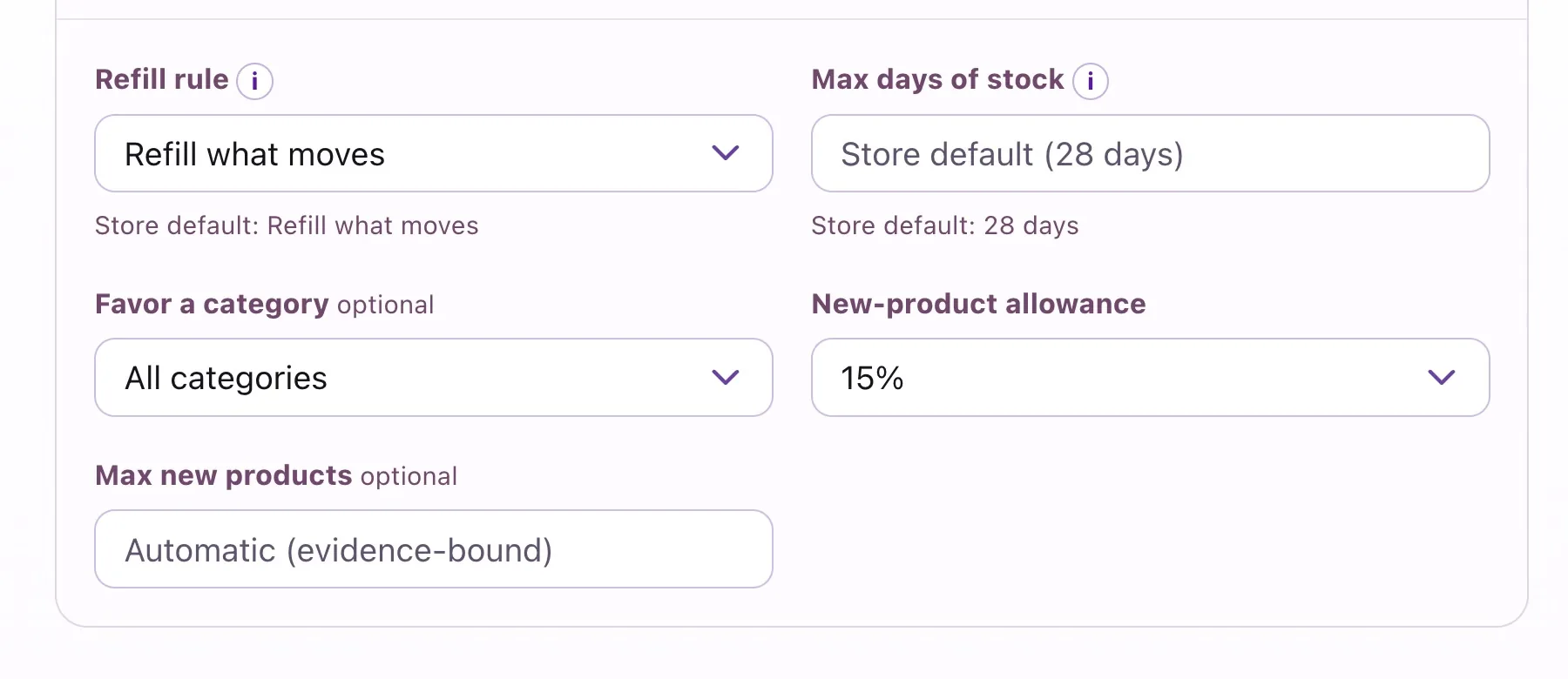
Replenishment and assortment have different jobs. OrderFlow can refill sellers, identify eligible gaps in the range, and consider suitable alternatives or returning products. Controlled new-product trials give the buyer a way to introduce choice within the configured allowance and available evidence.
The approach matters. Profit-focused trials need verified positive margin; rebate-focused trials need a verified positive rebate. Lower cash spend does not fund new-product trials. The buyer can review both the proposed cases and the products left out before accepting the selection.
Set the refill approach, stock-coverage ceiling, favored category and new-product allowance in the order’s preferences. Company category and excluded-brand settings also shape the range. For an individual store, Always keep and Stop buying let the team retain purchasing knowledge for future new or refreshed plans. A buyer’s note can record why that choice was made.
Let buying history inform the next choice
For eligible single-store plans, complete buying history can inform which established products are candidates for rotation and which previously carried products could return. A recent addition can have room to prove itself before another alternative takes its place.
Measured outcomes add another source of evidence. When received products have a sufficiently observed selling period, their results can influence the ranking of eligible future choices. Where the store has no usable product evidence, qualifying positive evidence from sister stores in the same retail business and supplier market can help inform a preference.
These history and outcome preferences apply to eligible single-store plans and need the supporting records. The store’s own evidence takes precedence, and the planner still applies the buying limits and product requirements for the selected approach.
Buy together. Plan for each store.
Choose the eligible stores to include in a shared supplier purchase and the receiving destination. OrderFlow builds the combined requirement from the individual stores’ sales, stock, expected arrivals and delivery calendars. The review shows the supplier cases to buy and how their units are allocated to the stores.
- A full shelf at one store does not hide a shortage at another. The combined need retains each store’s positive shortfall, so surplus stock elsewhere does not cancel the refill the short store needs.
- Local buying decisions still count. A store marked Stop buying contributes no automatic need or allocation for that product; another store can still need it. A triggered Always keep preference contributes that store’s refill need.
- Each store’s timing matters. For eligible selected-store orders, planning uses the store’s own supplier calendar and expected delivery date when assessing stock coverage.
Coordinate new products and range changes
Assortment can be coordinated across the purchase, too. A new-product trial’s first case goes wholly to one qualifying store. OrderFlow checks recorded trial assignments when choosing that recipient, helping the buyer see where the experiment belongs. A supported range rotation can replace a product at one store while retaining it in another store’s replenishment.
Review those store allocations alongside supplier availability, whole-case quantities and the spending limits before preparing the file. The single-store history and outcome learning described above remains separate from this combined-order planning.
The multi-location retail guide covers the staff access, transfers and reporting that surround that buying decision.
Open the reason behind each line
Pick a familiar product and inspect its sales, current stock, incoming supply, projected stock, target and recommended cases. OrderFlow presents the reason for the recommendation alongside the quantities. You can also examine excluded products and the reasons they were left out.
Change a case quantity, add or remove an item, or choose a different buying plan as you work through the selection. Refresh an uncommitted plan when the stock, incoming orders or buying setup needs updating, then review the changed recommendation before preparing the supplier file.
Follow one real buying question
Suppose a product looks short, but another case is due before the next delivery. Check the incoming record and its arrival date, then inspect the proposed refill and its explanation. Next compare P’s choice with Lower cash spend. That short review shows how demand, timing and purchasing priority work together.
Take the reviewed selection to your supplier
Once the buyer has reviewed the selection, OrderFlow can prepare the supported supplier file. Place the order through the supplier’s available process and retain its confirmation. The file is the handoff from the buying plan; downloading it does not create or submit a PURP purchase order.
Carry the buying decision through receiving
The supplier’s confirmation, allocation, invoice or other supported document enters PURP through Intake. Staff review product matches, the receiving store and quantities as the document becomes the purchase-order record. The supplier-document workflow can link the purchase order back to the sent OrderFlow order.
When the delivery arrives, staff record the products and quantities that actually came in. A shortage or changed allocation can then be understood against the purchase order and the earlier buying decision.
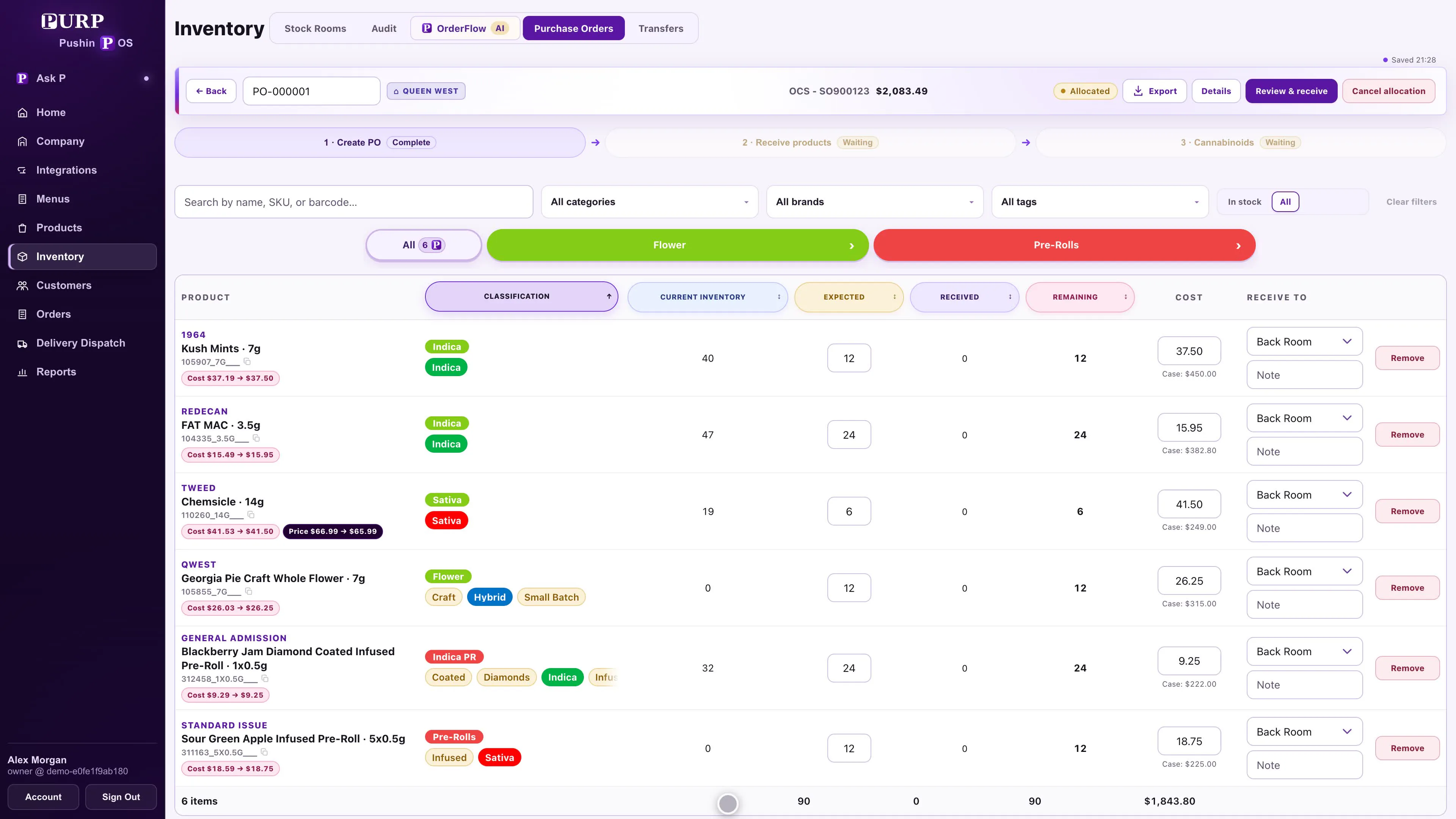
The inventory guide continues through short deliveries, stock counts and the records used by the next buying cycle.
Explore OrderFlow with your buying questions
A useful walkthrough starts with a supplier you buy from, your current form and the store records behind a recent buying decision. Follow that example through the inputs, four plans, line explanations and supplier handoff.
- Which stock and incoming deliveries inform the need?
- How do the four priorities change the proposed basket?
- Which cases protect existing sellers, and which introduce choice?
- What do the buyer preferences retain for future plans?
- What seasonal history informs this store’s selection?
- How does a combined purchase retain each store’s shortage, preferences and trial allocation?
- What evidence supports learning in this store?
- How will the supplier confirmation and physical delivery return to PURP?
OrderFlow is a PURP+ addition to the inventory and purchasing tools included with POS. See current PURP pricing, the POS cost guide and the OrderFlow product overview. Talk to PURP about the way your stores buy.